
AI 사진, 티 안나게 만드는 법
사진작가처럼 프롬프트 쓰는 기술
"AI로 만들었는데 너무 AI 같아요"
요즘 제일 많이 듣는 고민입니다. 눈은 플라스틱처럼 번들거리고, 피부는 도자기처럼 매끈하고. 한눈에 봐도 가짜 티가 나죠.
진짜 같은 AI 사진을 만드는 비결은 의외로 간단합니다. AI에게 '예쁘게 만들어줘'가 아니라, '사진작가처럼 말해주기' 입니다.
오늘 그 방법을 6단계로 정리해봤습니다.
1. 85mm, f/1.8, Focus - 카메라 언어를 쓰세요
AI는 '예쁜 여자'라는 말은 못 알아듣지만, '85mm 렌즈'는 귀신같이 알아듣습니다.
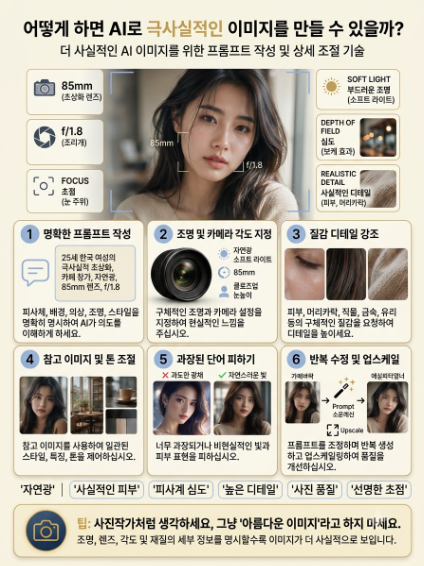
인포그래픽의 상단 3개가 바로 이겁니다.
- 85mm: 인물 사진의 표준. 얼굴을 가장 자연스럽게, 배경은 부드럽게 날려줍니다.
- f/1.8: 조리개를 활짝 열어서 피사계 심도를 얕게 만드는 값. 주인공은 선명하고 배경은 몽글몽글해지는 그 느낌입니다.
- FOCUS - Eye Level: AI 사진이 가짜처럼 보이는 이유 1위가 초점이 어딘가 어색한 경우입니다. focus on eyes, sharp focus라고 찍어주면 생기가 확 삽니다.

이렇게 쓰지 마세요: a beautiful woman in cafe
이렇게 쓰세요: a 25-year-old Asian woman with long dark hair, sitting by a window in a cafe, wearing a beige knit sweater, soft smile, 85mm, f/1.8, eye level, photorealistic
인물, 옷, 장소, 감정, 스타일까지 한 문장에 다 넣는 게 핵심입니다. AI는 상상을 못합니다. 시키는 만큼만 합니다.
2. 빛과 각도를 지정하세요 - 사진은 빛의 예술
같은 사람도 빛에 따라 인생사진이 되기도, 증명사진이 되기도 하죠.
SOFT LIGHT - 창문에서 들어오는 자연광 이 가장 실패 없는 빛입니다. 정면 플래시처럼 강한 빛은 AI 특유의 가짜 피부 질감을 더 부각시킵니다.
여기에 natural light, close-up, eye level을 더하세요. AI가 인위적인 조명을 쓰는 걸 막고, 실제 사진처럼 보이게 합니다.
3. 질감을 집요하게 묘사하세요
AI 사진이 가짜 같은 가장 큰 이유는 '너무 완벽해서'입니다.
이미지 3번처럼, 피부, 머리카락, 옷감을 언급해야 합니다.
- realistic skin texture with visible pores, subtle skin imperfections
- individual strands of hair, flyaways
- knitted fabric texture, wool sweater
모공, 잔주름, 날리는 머리카락 한 올까지. 이 사소한 불완전함이 오히려 진짜처럼 보이게 하는 트릭입니다.
4. 레퍼런스 이미지와 톤을 고정하세요
매번 다른 얼굴이 나오는 게 고민이라면 답은 하나, 이미지 레퍼런스입니다.
원하는 얼굴, 카페 배경, 커피잔, 원하는 색감 팔레트를 2∼3장 같이 넣고 use this image as face reference, same color tone이라고 명령하세요. AI가 얼굴, 소품, 전체 톤을 훨씬 안정적으로 잡아줍니다. 특히 캐릭터 일관성을 유지할 때 필수입니다.
5. '너무 예쁜' 단어를 빼세요 - Less is More
이게 제일 중요한데 다들 반대로 합니다.
ultra beautiful, perfect skin, flawless, highly detailed, ultra HD 같은 단어를 넣으면 AI는 더 예쁘게 만들려고 피부를 밀가루 반죽처럼 만들고 눈을 비현실적으로 키웁니다. 인포그래픽 5번의 왼쪽처럼요.
오른쪽처럼 자연스러운 사진을 원한다면, 과한 수식어를 빼고 현실적인 단어로 교체하세요.
가짜를 만드는 단어: perfect, flawless, ultra detailed, beautiful
진짜를 만드는 단어: natural, realistic, candid photo, unedited, photographic
6. 한 번에 끝내려 하지 마세요 - 수정과 확장의 마법
프로도 원샷 원킬은 안 합니다. 6번 과정이 그걸 보여줍니다.
- 일단 뽑고 (Generate)
- 마음에 드는 걸 고른 뒤 프롬프트를 더 구체적으로 수정하고 (Refine Prompt)
- Upscale로 해상도와 디테일을 살립니다.
요즘은 regenerate 기능으로 눈동자만, 피부만 따로 수정할 수 있어서 퀄리티가 훨씬 좋아졌습니다.
보너스: 진짜 같은 사진을 만드는 마법의 키워드 6개
프롬프트 마지막에 이 단어들을 습관처럼 붙여보세요. 확실히 달라집니다.
natural light / realistic skin / depth of field / high detail / photographic / sharp focus
TIP: '예쁜 사진'이라고 말하지 말고, 사진작가처럼 생각하세요.
빛은 어디서 오는지, 렌즈는 몇 mm인지, 각도는 어디서 잡는지. 이걸 구체적으로 말할수록 AI는 당신을 사진작가로 착각하고 진짜 같은 사진을 내놓습니다.
이 공식으로 만든 프롬프트 10개를 템플릿으로 정리합니다.
사진작가 공식
[인물+나이+특징] + [옷감 질감 묘사] + [장소+행동+감정] + [빛+렌즈+각도] + [질감 디테일] + [리얼 키워드]
금지 키워드: perfect, flawless, ultra beautiful, highly detailed, ultra HD
마법 키워드: natural light, realistic skin, depth of field, photographic, sharp focus, candid
컨셉: 27세 한국 여성, 긴 생머리, 내추럴 무드 (일관성 유지용)
1. 카페 창가 - 당신의 원본 예시
a 27-year-old Korean woman with long straight black hair, sitting by a window in a cozy cafe, wearing a beige chunky knit sweater with visible wool texture, soft candid smile looking outside, realistic skin texture with visible pores, individual strands of hair with flyaways, soft natural light from window, 85mm, f/1.8, eye level, depth of field, photographic, sharp focus on eyes
2. 출근길 오피스
same woman, wearing a white cotton shirt with linen texture, working on a macbook in a minimalist office, morning sunlight, realistic skin texture, subtle eye bags, natural light, 50mm, f/2.2, eye level, close-up, candid photo, unedited
3. 비 오는 거리
same woman in a transparent raincoat over a grey hoodie, walking on a rainy street in Seoul, holding a coffee, wet hair strands, raindrops on skin, overcast soft light, 35mm, f/2.8, street photography, realistic skin, photographic
4. 한옥 마당
same woman sitting on wooden floor of hanok, wearing natural linen dress, bare face, soft smile, wind blowing hair, realistic skin with freckles, afternoon natural light, 85mm, f/1.8, shallow depth of field, high detail, natural light
5. 서점
same woman in bookstore aisle, wearing dark navy cardigan with knitted texture, reaching for a book, candid moment, dust particles in air, realistic skin texture, flyaway hairs, window light, 50mm, f/2.0, eye level, sharp focus
6. 노을 테라스
same woman on rooftop terrace at golden hour, wearing beige trench coat, sipping wine, warm sunset backlight, skin with natural glow and pores, 85mm, f/1.4, bokeh background, depth of field, photographic, candid photo
7. 침실 모닝
same woman in white bed, wearing light cotton pajamas with wrinkle texture, messy morning hair, no makeup, sleepy smile, realistic skin with imperfections, soft morning light from curtain, 35mm, f/2.0, eye level, unedited, natural light
8. 지하철
same woman in subway, wearing black leather jacket with textured grain, earphones on, looking out window, candid street portrait, fluorescent mixed with window light, realistic skin, 28mm, f/2.8, documentary photo, sharp focus
9. 꽃시장
same woman in flower market, holding peonies, wearing light green knit, soft smile, pollen details on sweater, natural skin texture, individual hair strands, soft diffused light, 85mm, f/1.8, close-up, depth of field, photographic
10. 작업실 (캐릭터 일관성 고정용)
portrait of same woman, face reference, neutral background, wearing same beige knit sweater, natural expression, realistic skin with visible pores, studio window light, 85mm, f/2.2, eye level, sharp focus on eyes, same color tone, candid photo -- use this image as face reference
이렇게 쓰세요
- 10개 전부 동일 인물로 쓰려면 10번 이미지를 뽑아두고 레퍼런스로 고정하세요.
- 마지막에 natural light / realistic skin / depth of field / photographic / sharp focus 6개 중 3개만 붙이세요. 다 붙이면 오히려 플라스틱 됩니다.
- 마음에 드는 걸 하나 골라서 hair texture를 더 강조해줘, 조리개를 f/1.4로 더 열어줘 식으로 Refine 하세요.
와인병다육이세상사는이야기
창조적이고 유니크한 와인병다육이의 세상사는 이야기
kenny762.tistory.com
'컴퓨터,AI' 카테고리의 다른 글
| 공부머리가 없는 게 아니다, 프롬프트가 없었던 거다. (0) | 2026.08.02 |
|---|---|
| "블로그 쓸 시간도 없는데 무슨 디지털 프로덕트냐"는 사람에게 (0) | 2026.08.01 |
| 왜 무료 오픈소스 변환기가 답일까? (0) | 2026.08.01 |
| 정기적으로 꼭 해야 하는 프롬프트 다이어트 (0) | 2026.08.01 |
| 파워포인트에 인생 갈아 넣고 있나요? AI 프롬프트로 5시간을 15분으로 줄이는 법 (0) | 2026.08.01 |


댓글