
구글제미나이가 프롬프트한줄로 비디오편집
이미지 한 장 생성하는 시대는 끝났습니다. 이제는 내가 찍은 평범한 영상 10초를 던져주고 "할리우드 영화처럼 만들어줘", "뒤에 지나가는 사람 지워줘", "옷을 명품 정장으로 바꿔줘" 라고 말하면 끝나는 시대입니다.
최근 공개된 Gemini의 비디오 편집 기능은 크리에이터 판도를 완전히 바꾸고 있습니다. 포토샵, 프리미어 프로를 못 다뤄도 괜찮습니다. 당신이 필요한 건 정확한 프롬프트 하나뿐입니다.
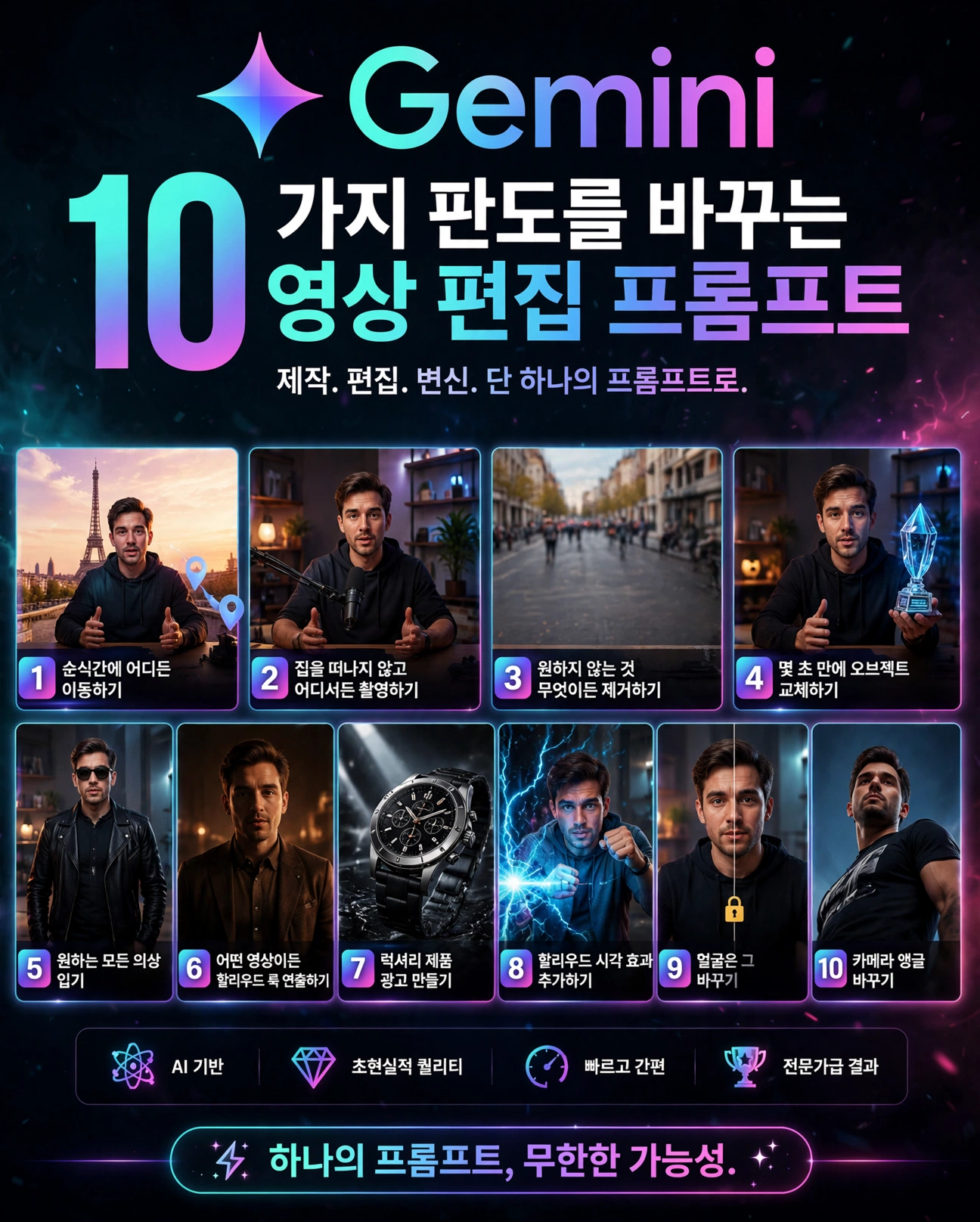
이 10가지 게임 체인저 비디오 편집 프롬프트를 완벽 정리하오니 참고하시기바랍니다.
왜 지금 Gemini 비디오 편집인가?
기존 AI 비디오 툴(Runway, Pika)은 새로 만드는 데 강했다면, Gemini는 '내가 찍은 원본 영상을 유지하면서' 바꾸는 데 압도적입니다. 특히 얼굴 고정력이 미쳤습니다. 내 얼굴, 내 목소리, 내 움직임은 그대로 두고 배경, 옷, 조명만 바꾸니까 유튜버, 쇼핑몰 사장님, 1인 기업에게 완전 치트키죠.
핵심 원칙: Keep [지켜야 할 것] unchanged. 이 한 문장이 영상의 퀄리티를 결정합니다.
10가지 프롬프트, 그대로 따라하세요
1. MOVE ANYWHERE INSTANTLY - 순간 이동
파리 에펠탑 앞에서 브이로그를 찍고 싶다고요? 비행기 탈 필요 없습니다.
프롬프트:
Replace the background with [에펠탑이 보이는 파리 루프탑 선셋]. Keep [내 얼굴과 몸짓] exactly the same. Add realistic travel vlog lighting, depth of field, and natural shadows. Make it look like it was actually filmed there.
2. FILM ANYWHERE WITHOUT LEAVING HOME - 집에서 스튜디오 촬영
지저분한 방에서 팟캐스트 찍었나요? 프리미엄 스튜디오로 바꿔버리세요.
프롬프트:
Replace the background with a modern, premium podcast studio. Keep the speaker exactly the same. Match the lighting, shadows, perspective, and camera angle so it looks completely realistic. Do not change the face, clothing, voice, or lip movement.
3. REMOVE ANYTHING YOU DON'T WANT SEEN - 지우고 싶은 건 지워라
뒤에 지나가는 사람들, 널브러진 옷, 지저분한 책상. AI 지우개로 완벽하게 청소합니다.
프롬프트:
Remove [뒤에 있는 행인] from this video. Fill the space naturally using the surrounding background. Keep [나], lighting, shadows, and camera movement unchanged. Make the edit seamless, clean, and realistic.
4. SWAP OBJECTS IN SECONDS - 물건 교체
손에 들고 있던 커피잔을 순식간에 다이아몬드 트로피, 신상 제품으로 바꿔보세요. 광고주들이 가장 좋아하는 기능입니다.
프롬프트:
Replace [old object] with [glowing crystal trophy]. Keep the original camera angle, lighting, perspective, and movement. Make [new object] blend naturally into the scene with realistic shadows, reflections, textures, and motion. Do not change or background.[person]
5. WEAR ANY OUTFIT YOU WANT - 옷 갈아입기
다시 찍을 필요 없습니다. 원피스, 슈트, 힙한 스트릿룩까지 5초면 갈아입습니다.
프롬프트:
Change my outfit into [sophisticated black luxury streetwear look]. Keep my face, body shape, pose, and movement unchanged. Make the new outfit fit naturally and move realistically with my body. Match the original lighting, shadows, perspective, and fabric behavior.
6. GIVE ANY VIDEO A HOLLYWOOD LOOK - 시네마틱 필터
평범한 아이폰 영상을 영화 예고편처럼. 색감 하나로 조회수가 달라집니다.
프롬프트:
Edit this video into a cinematic clip. Keep my face and outfit unchanged. Improve the lighting to look like warm sunset light. Add slow cinematic camera movement, soft contrast, and a premium luxury visual mood. Do not change the background or my body movement.
7. CREATE LUXURY PRODUCT ADS - 명품 광고 만들기
시계, 가방, 화장품 하나만 찍어두면 끝. Gemini가 백화점 광고를 만들어줍니다.
프롬프트:
Transform this product video into a luxury commercial. Keep the [시계] as the hero. Add dramatic studio lighting, slow dolly zoom, black smoke background, and premium reflections on the floor. Make it look like a Rolex ad.
8. ADD HOLLYWOOD VISUAL EFFECTS - 초능력 VFX
손에서 번개가 나오고, 눈에서 레이저가 나옵니다. 릴스, 틱톡 조회수 보장 기능.
프롬프트:
Add realistic [blue electric superpower] VFX coming from my hands. Keep my face and movement unchanged. Match the lighting interaction so the effect illuminates my skin and clothes. Make it ultra-realistic and cinematic.
9. KEEP YOUR FACE EXACTLY THE SAME - 얼굴 잠금
AI 편집의 가장 큰 단점인 '얼굴이 변하는 현상'을 막는 핵심 프롬프트입니다. 어떤 편집을 하든 이 문장을 꼭 넣으세요.
프롬프트:
Lock my face identity with 100% accuracy. Do not change my facial structure, eyes, nose, mouth, or skin tone. You can change everything else like background, outfit, and lighting, but keep my face exactly the same as the original video. Add face-lock protection.
10. CHANGE THE CAMERA ANGLE - 카메라 앵글 바꾸기
이미 찍은 영상의 앵글을 로우앵글, 드론샷, 클로즈업으로 바꿔줍니다.
프롬프트:
Change the camera angle to a [low-angle heroic shot looking up]. Keep the subject and action exactly the same. Re-render the perspective, background, and lighting to match the new angle. Make it look like it was filmed with a different camera position.
전문가가 알려주는 프롬프트 성공 꿀팁 3가지
1. Do NOT Change를 구체적으로 써라: "얼굴 바꾸지 마"가 아니라 "얼굴 구조, 수염, 피부톤, 헤어스타일 바꾸지 마"처럼 디테일하게.
2. 조명(Lighting)을 꼭 언급하라: AI가 가장 실수하는 게 조명입니다. "Match the lighting and shadows" 이 한 줄이 리얼리티를 200% 올려줍니다.
3. 움직임(Movement)은 건드리지 마라: "Keep original movement and lip-sync"을 넣어야 입모양이 어색해지는 걸 막을 수 있습니다.
이제 편집자는 필요 없습니다. 아이디어만 있으면 됩니다.
당신은 이 10가지 중 어떤 프롬프트가 가장 먼저 써보고 싶나요? 저는 당장 5번으로 제 후드티를 명품 정장으로 바꿔보려고 합니다.
ONE PROMPT. ENDLESS POSSIBILITIES.
와인병다육이세상사는이야기
창조적이고 유니크한 와인병다육이의 세상사는 이야기
kenny762.tistory.com
'컴퓨터,AI' 카테고리의 다른 글
| 초등학생이 파워포인트보다 캔바를 먼저 배워야 하는 이유 (0) | 2026.08.16 |
|---|---|
| 초보자는 숫자를 보고, 고수는 흐름을 봅니다. (0) | 2026.08.16 |
| 클로드를 잔인할 정도로 정직하게 만드는 방법 (0) | 2026.08.16 |
| 일주일 만에 클로드를 내 AI 직원으로 만드는 법 (0) | 2026.08.16 |
| 크롬이 거북이처럼 느려졌다고? 속도 2배로 되돌리는 7가지 응급처치법 (0) | 2026.08.15 |


댓글